KeyHatch · keyhatch.org
Sign inStart typing

FREE TYPING COURSES · ENGLISH & 中文拼音

Learn to type without looking. One key at a time.

KeyHatch is a free typing course that runs in your browser. Guide hands light the finger for your next key, and every unit ends with a short check you take without them, so you can see what you can do on your own.

  • No download
  • No account for your first three units
  • Practice stays in your browser
The practice view in English unit 78. Correct letters turn green, a fixed mistake keeps a dotted mark, and the blue underline shows the next character.
90
English units in 11 stages, from the F key to editing and forms
120
中文拼音 units open to everyone, with a built-in input method
95
printable characters on a US keyboard, every one of them taught
Free
No card, no trial, no ads

HOW A UNIT WORKS

Practice with a guide. Then pass without one.

Every unit follows the same short loop. While you practice, the next key and its finger are shown. In the check the guide switches off. Pass it, and the units that build on it open.

  1. 01 · guide on

    Warm-up

    Earlier keys, so they stay with you.

  2. 02 · guide on

    New key

    See the finger before you press.

  3. 03 · guide on

    Short groups

    Key patterns, not words yet.

  4. 04 · guide on

    From memory

    The same patterns, recalled.

  5. 05 · guide on

    Words

    Real words, phrases and forms.

  6. 06 · guide on

    Mission

    A small task in the unit's story.

  7. 07 · guide off

    Check

    On your own. Pass to open what's next.

TWO COURSES

One keyboard. Two languages.

Learn English touch typing, Chinese Pinyin typing, or both. Each course keeps its own progress, so one never gets in the way of the other.

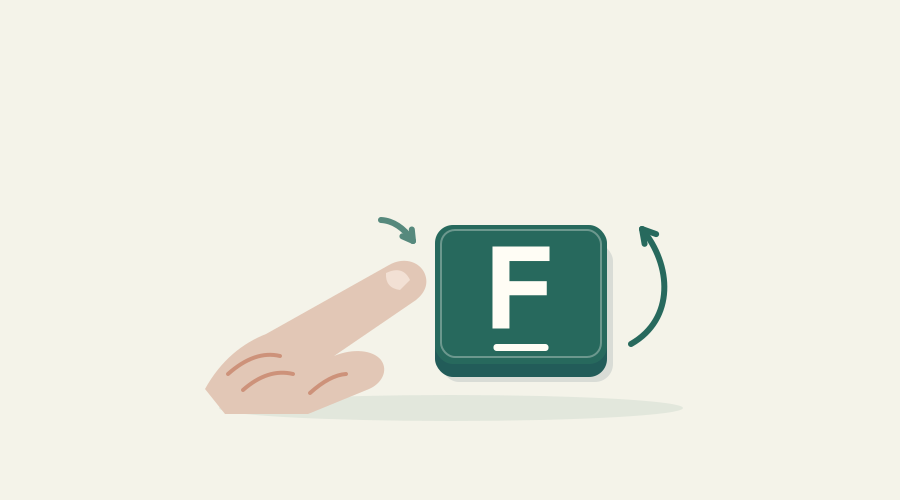
Illustration from unit 1: a fingertip meets the ridged F key, then lifts to release it.

ENGLISH · 90 UNITS · US KEYBOARD

Touch typing, from F to fluent

Start with one key. Finish with every printable character, editing without starting over, and moving through a form.

  • Units 1–3 open to everyone, no account
  • Units 4–90 free with an account (adults)
  • 5 to 10 minutes a unit
See the English course →
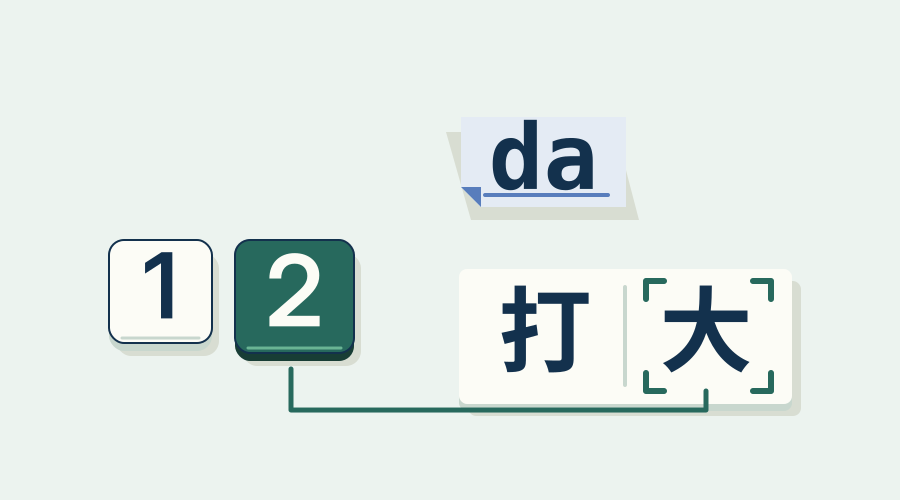
Illustration from Chinese unit 17: number keys choose a candidate word.

中文 · PINYIN · 120 UNITS

拼音打字 · Chinese Pinyin typing

Type Chinese with KeyHatch's own pinyin input method, so there is nothing to install. Go from your first character to final checks in text, mixed input and editing.

  • Open to everyone, no account
  • Built-in full-pinyin input method
  • Most units take 3 to 6 minutes
查看中文课程 →

BUILT FOR PRACTICE

Made for real keyboards and real learners.

Hands that show the way

Robotic guide hands light the finger for the next key before you press it. Fade them, hide them, or practice without them.

Six keyboards, same 78 keys

Choose Classic, Arcade, Macaron, Slim, Typewriter or Workshop. Every key stays in the same place, so a lesson means the same on each.

Works without 3D

No graphics acceleration? A flat 2D keyboard keeps every lesson usable. Light and dark, reduced motion and full keyboard control are built in.

Your typing stays yours

Typing is checked in your browser. KeyHatch doesn't record raw keystrokes, and analytics stays off unless you allow it, and never runs on practice pages.

BEYOND TYPING

Typing is the first skill, not the last.

When typing feels easy, keep going: edit text precisely, organize files, learn Vim and find your way around a terminal, with safe recovery built into every track.

Explore all 29 skills →

Ready to practice

  • Keyboard & text control12
  • Files & paths12
  • Vim12
  • Terminal & Linux12
  • Safety & recovery9

In preview

  • Git
  • SQL
  • Regular expressions
  • Markdown
  • Spreadsheets
  • Python
  • Bash
  • Docker
  • + 15 more

Terminal, Git and other tool exercises run in labeled practice spaces built for learning. They are not a full Linux machine or the complete tools.

PARENTS & TEACHERS

Calm practice, clear limits.

KeyHatch is made for learners from about age 10. The open units need no email address and no account, and nothing ranks one learner against another.

Read the guide for parents and teachers →
  • No child email needed for the open units
  • No ads, no public rankings, no streaks that punish a missed day
  • Practice records stay on the device you use
  • Accounts are for adults for now. Family profiles aren't available yet.

Questions, answered.

Is KeyHatch really free?
Yes. There is no payment option at all right now: no card, no trial and nothing that turns into a charge later. Units 1–3 of the English course and the whole Chinese course are open to anyone. The rest of the English course needs a free account.
Do I need to install anything?
No. KeyHatch runs in a desktop browser. The Chinese course includes its own pinyin input method, so you don't install one for that either.
What keyboard do I need?
A physical keyboard with the US (ANSI QWERTY) layout. Other layouts, touch keyboards and the numeric keypad aren't supported yet. You can browse on a phone, but practice needs a physical keyboard.
Where is my progress saved?
In the browser you practice in. It isn't uploaded, and cloud saving isn't available yet. Clearing your browser's site data removes it, so keep practicing in the same browser on the same computer.
Will I get a certificate?
No. Scores and checks are learning feedback about what you can do in the course. They are not a certification or a typing test result for an employer.
See all questions →

Your first key is F.

Unit 1 takes about five minutes. Find the ridge on the F key, press it, and let go. That's the whole lesson.